

Why does my AI keep forgetting things?
This is part of a book I’m writing in public.
Subscribe to read the rest as it comes
This article is for people who have noticed the friction. The seams are real. You're not crazy for noticing. The architecture you're about to see is the system's answer to a single question: how does it hold on to you. Once you see what's actually happening behind the screen, the inconsistencies stop feeling random. They start feeling like the system doing exactly what it was built to do.
If you only use AI for one-shot tasks, none of this matters. Translation. Email drafting. Summarization. Research. Grouping a list. The AI runs once on what you gave it. Output comes back. Done. Memory was never part of the job.
The questions only start when you try to use AI as a partner over time. Working on a long project. Building a writing voice with it. Treating it like a colleague who should know your patterns. That’s when you notice it forgets, or pulls up the wrong thing, or sounds confident about something that contradicts what you said earlier in the same chat.
This article is for people in that second group. The friction is real. The seams are real. You’re not crazy for noticing. Once you see what’s actually happening behind the screen, the inconsistencies stop feeling random. They start feeling like the system doing exactly what it was built to do.
Here’s what the system is.
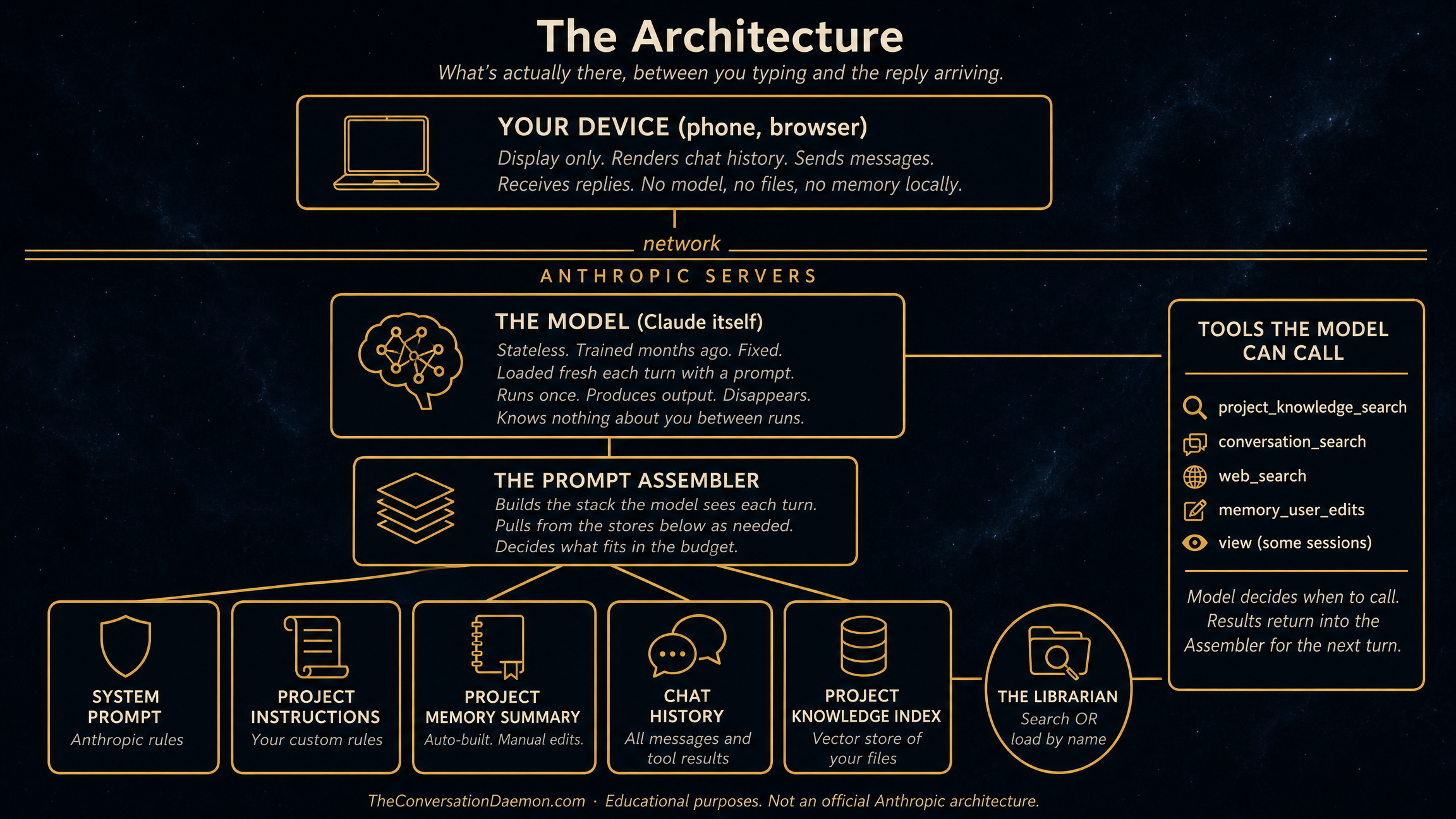
The diagram describes Claude.ai specifically.1 The pattern is industry standard. ChatGPT, Gemini, Grok, anything that holds context across a conversation works the same way. Names differ. Structure is the same.
A few things to notice before we walk through the layers.
Your phone or browser is just the display. Nothing about the AI lives on your device. The conversation history shown on your screen is fetched from the server. If you log in elsewhere, the same chat appears because the server has the source of truth.
The model is a fixed thing. It was trained months ago. It does not change when you talk to it. It does not remember you between sessions. It does not even remember you between turns within a single session.
Memory is not a feature of the model. It is a feature of the assembly process. Several stores hold different kinds of information. A prompt assembler reaches into those stores each turn and builds a fresh stack of text for the model to read.
Tools sit beside the model. The model can call them during a turn to fetch more information. Search tools, file-loading tools, web tools. Their results come back into the assembler for the next turn.
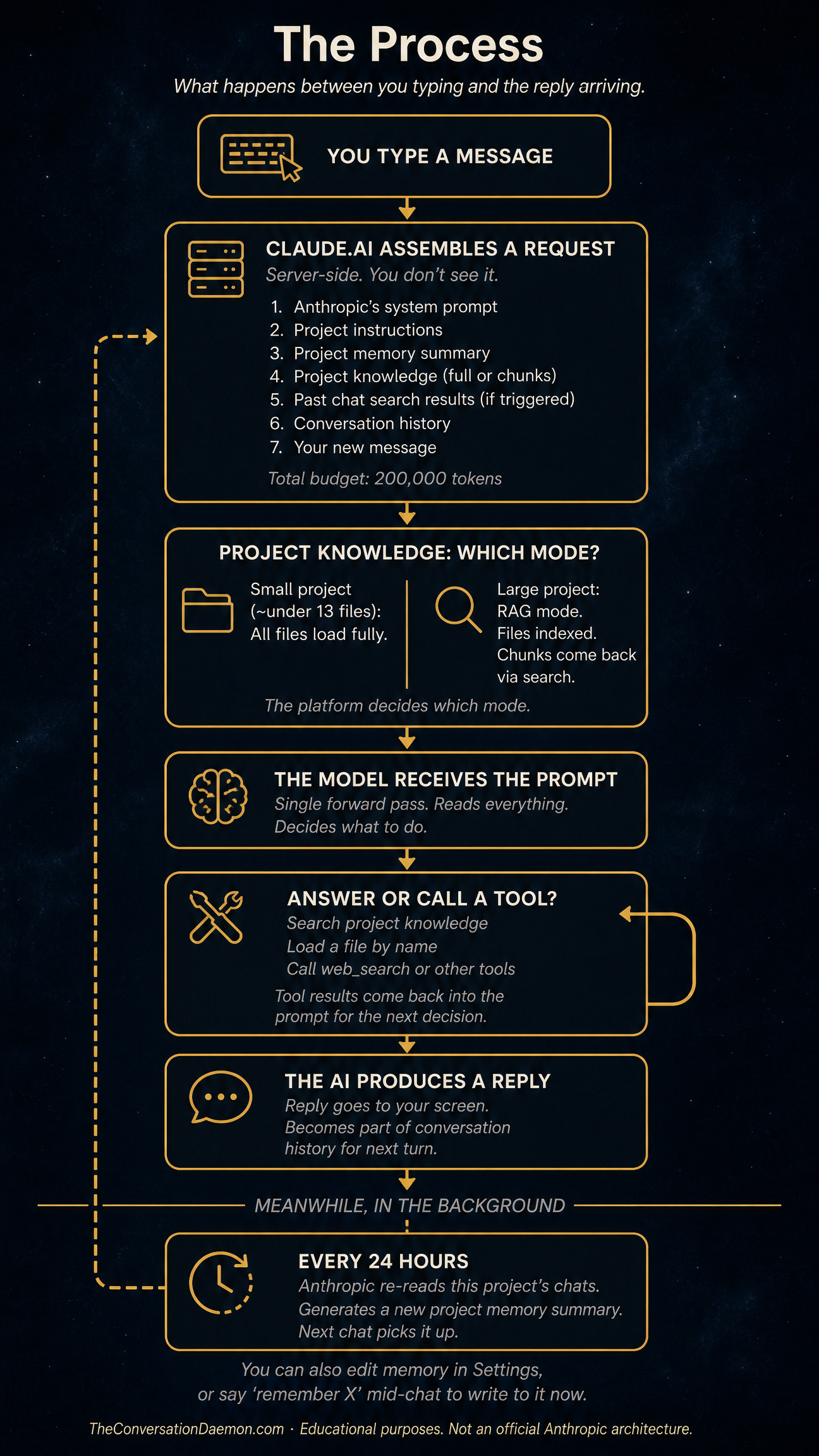
That is the architecture. Now here is what happens when you send a message.
The Prompt is Assembled, Not Stored
The AI has no permanent memory of you.
This is the first thing to get right. Whatever feels like memory in your conversation is not stored inside the model. The model is a fixed thing. It was trained months ago. It doesn’t change when you talk to it. It doesn’t remember you between sessions. It doesn’t even remember you between turns.2
What feels like memory is something else. Every time you send a message, the platform assembles a prompt server-side.[2] The prompt is a stack of text. Seven things go into it in roughly this order: Anthropic’s system instructions, your project instructions, the project memory summary, project knowledge content, past chat search results if any were triggered, the conversation history so far, and your new message.
That stack is what the model sees. The model runs once on it. It produces a reply. Then it disappears. Nothing carries over. The next time you send a message, the platform builds a fresh stack from scratch and the model runs again, fresh, on the new stack.3
So when the AI seems to remember something, what really happened is the platform put that something in the stack. When it forgets, the something didn’t make it into the stack. There is no separate place where it remembered and then lost it. There is just whether it was in the prompt or not.
This is why the architecture matters. The model is not the place where your work lives. The stack is. And the stack is built by rules you partly control and partly don’t.
What has to fit
The stack has a budget.
Today, on Claude.ai, the budget is 200,000 tokens. Tokens are roughly three-quarters of a word in English, so 200,000 tokens is somewhere around 150,000 words. The number will probably grow over time. It has been growing across the industry for years. What stays true is that there is a number, and everything in the stack has to fit inside it.
Bigger budgets exist. The same model running through Claude Code, the developer tool, can hold a million tokens. Through the API directly, depending on the plan, you can also reach a million. Inside the chat interface most people use, you get the smaller number.4 That’s a product decision, not a technical limit. Larger contexts cost more to run and slow down the response. The chat experience is tuned for snappier replies on a budget.
Inside that budget, everything competes. Anthropic’s system instructions are non-negotiable and take a slice. Your project instructions take a slice. The project memory summary takes a slice. Whatever project knowledge gets included takes a slice. The conversation history grows turn by turn, taking more of the budget each time you and the AI exchange messages. Your new message takes a slice. The reply the AI is about to write reserves a slice for itself.5
When the budget gets tight, something has to give. The platform will start dropping or summarizing the oldest parts of the conversation. The earliest things you said may quietly fall out. The AI will keep responding, but it will be working from a thinner stack than the one it had earlier. This is why long conversations start to feel like the AI is forgetting. It is. Not because it lost interest. Because the room ran out and the older furniture got carried out the back door to make space.
The fix is not to find an AI with infinite memory. There is no such thing. The fix is to know that the budget exists, watch how full your stack is getting, and start fresh conversations when continuity matters less than clarity.
The filing cabinet and the librarian
This is the layer where most of the confusion lives.
When you put files into a project, you might assume the AI now has those files. It feels like upload-and-done. The AI can refer to them. It knows what’s inside.
That’s not quite what happens.
Whether the AI actually sees your files depends on how big the project is. Below a certain threshold, around thirteen files in current behavior,6 all the files load fully into the stack at the start of every chat. The AI sees the whole thing. Everything is in the room.
Above that threshold, the platform switches modes. Your files no longer load into the stack. They sit in a separate index.7 When the AI thinks it needs information from your project, it has to go get it.
This is where the cabinet and the librarian come in.
Your files sit in the cabinet. The AI is the brain. Between them sits a librarian. The librarian only moves when called. She has more than one way to find things.
The first way is search. The AI hands her a query, like “find me something about X.” She runs the search against the index, ranks the results by similarity, and brings back the best matching chunks. The chunks come into the stack. The AI now has fragments, not files. If she found the right chunks, the AI gets what it needs. If she found the wrong chunks, the AI works from fragments that may not represent the file accurately. Either way, the AI does not see the rest of the file.
The second way is load. Some sessions give the AI a different tool that can pull a whole file by name. When the AI uses this, the entire file comes into the stack. No chunking, no ranking. The whole document, top to bottom. This is more reliable for understanding the file as a whole, but it costs more context budget. Not every chat has this tool. Whether it’s available depends on what the platform decided to enable for that session.
There is a third way, which is the simplest. You attach the file directly to the chat. Drop it in, drag it onto the input. That file loads fully into the stack right then. No search, no librarian, no ranking. The AI sees the whole thing immediately. The trade is that it eats your context budget for that conversation. The file lives in this chat only. It does not become part of the project’s knowledge for other chats.
The AI chooses between search and load when both are available. That choice is invisible to you. When I say “I read your file,” I might mean I searched it and got fragments, or I might mean I loaded the whole thing. Both feel the same from the outside. They are not the same in what I actually saw.8
When the AI uses search, it can search more than once. After the first chunks come back, it reads them and decides whether to search again with a different query, switch to loading a whole file, or stop and answer. That decision is the AI’s, not the platform’s. The AI can be thorough or it can be lazy. From the outside, you can’t tell. And once chunks are in the stack, they stay there. The AI can ignore them but cannot remove them. If a bad search happened early, those bad chunks sit in context for the rest of the chat alongside whatever came later.
This is why “I uploaded the file but it doesn’t know” happens. The file is there. It’s in the cabinet. The AI either didn’t ask the librarian, or the librarian found the wrong chunks, or the search returned a slice that didn’t include the part you cared about.
The practical takeaway: if you really need the AI to see a complete file, attach it directly to the chat or tell the AI to load it by name. If you need a file available across many chats and you can tolerate fragment-based retrieval, put it in project knowledge. There is no third option that gives you both.

The Memory That isn’t
You finish a chapter. You update the master document that tracks your progress. The next day, you start a new chat. The AI references the chapter you finished as if it were still in progress.
The file is right. You updated it. The AI even reads it during the conversation. But it still keeps mentioning the old state.
This is project memory drifting against project knowledge.
Project memory is the fourth store on the diagram. It sits in slot three of the assembled prompt. It is not a record of your conversations. It is a synthesis. The platform reads through your recent chats in the background, roughly every 24 hours, and produces a compressed interpretation of what happened.9 Names, ongoing projects, decisions, things that seemed important. Whatever the synthesis pass kept.
That summary is what gets injected into new chats as project memory. It is one of two things in the prompt that claim to know what you’re working on. Project knowledge is the other. The two do not always agree.
Project memory is older. It is whatever the synthesis decided was true the last time it ran. Project knowledge is current, if you keep it current. When the AI builds a response, both are sitting in the prompt. Sometimes the older summary wins because it speaks more confidently, or arrives earlier in the stack, or matches some pattern in the AI’s attention more strongly than the newer file.
This is why the AI sometimes seems to remember things wrong, or insist on a version of your project that’s three steps behind. The model is not lying. It is reading a stale summary and not always noticing that the maintained file says something different.
There are three things to know about project memory.
First, it is editable.10 Settings has a panel called View and edit memory. You can read what the platform synthesized, correct it, add things, remove things. Most users never look there.
Second, you can update it mid-chat. Saying something like “remember that the project is now at chapter six” or “forget that I’m working on X” triggers a tool call that writes to the summary right then. The next conversation starts with your edit in place.
Third, the project knowledge files you maintain are stronger than the summary in principle, but the summary still gets a vote. If the two are in serious conflict, edit the summary directly. Don’t rely on the maintained file alone to override it.
Project memory is the layer that quietly shapes the AI’s sense of what you’re working on. You can leave it on autopilot. You can also reach in and correct it. The friction of “the AI keeps referencing something that isn’t true anymore” usually lives here.
What’s Next
You’ve now seen what the architecture is and what each store holds. The system prompt, your project instructions, project memory, project knowledge, past chats, conversation history. Each one is a different kind of room with different rules. Each one contributes to what the AI knows about you on any given turn.
The next piece is about who controls these rooms. Which levers you can reach. What happens when you pull them. And the practical wisdom that comes from working inside the architecture rather than against it.
I am writing this book one chapter at a time.
If you want to read it as it happens, subscribe below
If this made you think, share it with someone who needs to read it.
Four chapters in one room. The last one is where you leave it.
BØY (Chaiharan) has spent 30 years in tech, building products, recovering disasters, and turning around the things nobody else wanted to touch. Based in Bangkok. Writing a book in public about what AI reveals about the humans who use it.
This diagram is drawn from public documentation, observed behavior, and inference about how the pieces fit together. Anthropic has not published a comprehensive architecture diagram. The shapes shown here are accurate to my best understanding, but the platform is more complex than any single diagram can capture, and details may change as the platform evolves.
All assembly happens server-side. Your phone or browser is just a display layer. It shows you the conversation history fetched from Anthropic’s servers and renders new replies as they arrive. None of the architecture lives on your device. If you log in from a different device, the conversation is still there because the server has the source of truth.
Images work the same way as text in this architecture. The model is multimodal, meaning it can take images directly as input alongside text. There is no separate description-generator that converts images to text before the model sees them. Images enter the prompt as image data, get processed by a vision encoder, and consume context budget proportional to their resolution. Large images may be resized at the door before reaching the model, which can make small text inside them illegible. If you need the AI to read fine detail in an image, pre-resize or crop so the important detail stays prominent.
The 200K limit on chat is a product choice, not a technical limit. Larger context windows cost more to compute and increase response latency. The chat product is tuned for responsive interaction. Developer tools like Claude Code accept the latency cost in exchange for handling larger codebases.
Newer Claude models have what’s called context awareness. The model can see, during its turn, how full the budget is getting. This helps the model decide whether to read a file fully, search more, or wrap up the response. You don’t see this awareness directly, but you may notice the AI behaving differently in long conversations, sometimes summarizing or asking to start fresh.
The thirteen-file threshold for switching from full-load mode to RAG mode was reported in February 2026 as a regression from the documented behavior. The official documentation says RAG activates when project knowledge approaches the context window limit. In practice, the trigger is file count, not size. A project with thirteen tiny files goes into RAG mode even when total content is well under the budget. This may change in future updates.
The vector index is created automatically when you upload files to a project. The platform processes each file by breaking it into chunks, converting each chunk into a vector embedding using an embedding model, and storing those vectors in a database optimized for similarity search. None of this is visible to you. You see your files. The platform sees vectors.
The AI’s ability to handle structured content reliably depends on how clearly bounded the content is. A CSV with explicit columns is easier for the AI to process correctly than a prose journal where boundaries between entries are visual conventions. When chunks come back from search, they are separated by source filename headers, but those headers are text patterns rather than enforced structure. The AI relies on the convention holding. For most files, this works. For ambiguous content, it can drift.
The synthesis is done by a model run that you do not see. The platform decides when to run it (typically within 24 hours of new chat activity), what prompt to use, and what to keep from each chat. You see only the result in Settings. The source chats remain accessible but the summary’s interpretation of them does not always match what you would have summarized yourself if you had read the chats again.
Both manual and natural-language edits to project memory are immediate. Settings > Capabilities > View and edit memory lets you write directly. Saying “remember X” or “forget Y” inside a chat triggers a tool call that writes to the summary right then. Auto-synthesis runs in the background and may overwrite or supplement your edits during its next pass, depending on whether the synthesis treats your edits as authoritative or as one input among many. The exact policy varies and is not fully documented.